

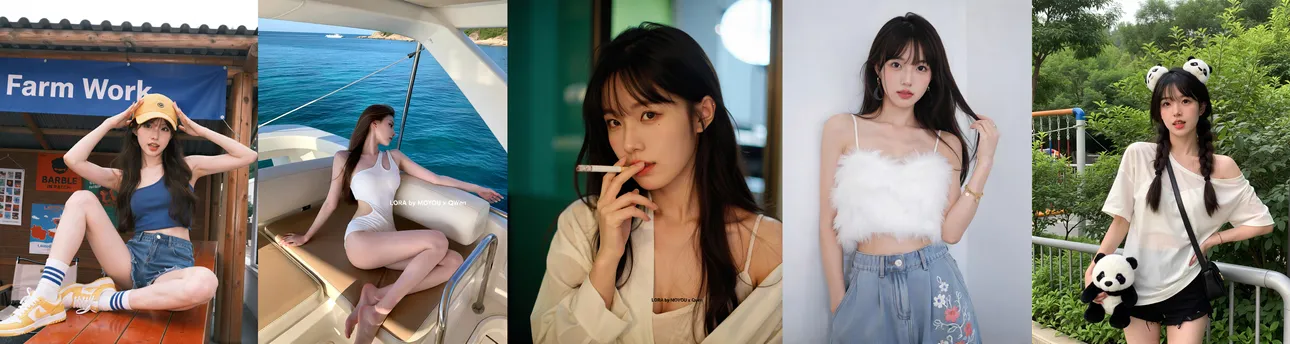
 Recommended LoRA Weight: 0.8/0.9
This is a realism enhancement LoRA designed for Qwen-Image. It is currently the ONLY non-photographic realistic portrait model enhanced for zero/weak depth-of-field. The style leans towards the smooth, processed texture typical of smartphone camera algorithms. Trained with bilingual (Chinese and English) long-caption datasets, it shows excellent responsiveness to both languages. It can render male characters, generate ready-to-use posters directly, and spell out Chinese characters accurately. Click here for the VIP version
Prompt Example (Chinese): 这张照片是一位年轻的亚洲女性站在柔软的白色背景下.她有一头又长又直的深棕色头发,从肩膀垂到背.她的皮肤白皙光滑,微妙而自然的妆容让她看起来更年轻.她穿着一件黑色罗纹无袖连衣裙,垂到膝盖.这件连衣裙简单而优雅,有一件合身的上衣和一条略微喇叭形的裙子.她左肩上戴着一条精致的金色链带,采用经典的棕色绗缝手提包设计.手提包放在她左边,稍微在她身后.她的表情平静而沉思,眼睛轻轻闭上,嘴唇微微张开.她右手腕上戴着薄银手镯.柔和的灯光营造出一种宁静、近乎梦幻的氛围.艾克的氛围,她身后的白色窗帘让光线轻轻扩散,在她身上创造出微妙的阴影和亮点.照片的整体情绪平静而内省,英文小字一行:“LORA by MOYOU x QWen”,放置在图片中下部位置
Prompt Example (English): This photo is of a young Asian woman standing against a soft white background She has long and straight dark brown hair that hangs from her shoulders to her back Her skin is fair and smooth, and the subtle and natural makeup makes her look younger She was wearing a black ribbed sleeveless dress that hung down to her knees This dress is simple and elegant, with a fitted top and a slightly flared skirt She wore a delicate golden chain strap on her left shoulder, from a classic brown quilted handbag design The handbag is placed on her left, slightly behind her Her expression was calm and contemplative, her eyes gently closed, and her lips slightly parted She is wearing a thin silver bracelet on her right wrist The soft lighting creates a peaceful, almost dreamlike atmosphere, and the white curtains behind her allow the light to gently diffuse, creating subtle shadows and highlights on her body The overall mood of the photo is calm and introspective, a line of small English text: "LORA by MOYOU x QWen", placed in the lower-middle position of the image
If writing detailed natural language prompts gives you a headache, try using an AI text tool to format a reference prompt and rewrite it according to your needs.
Usage Recommendations: Since Qwen-Image requires a significant amount of VRAM locally, online generation is recommended. Here are the recommendations for local deployment:
Basic Settings: In ComfyUI, open the "Workflow" dropdown menu, select "Browse Templates", and find the template workflow for Qwen-Image to use.
Sampler: euler
Scheduler: simple
Steps: 20-30
CFG: 4 (feel free to experiment and adjust)
Model sampling algorithm AuraFlow Shift: 3 (feel free to experiment and adjust)
Recommended Resolutions: 768×1024, 768×1152, 1024×1152, 1024×1280, 1024×1536, etc.
If using Joy Caption Two for prompt interrogation:
Recommended Prompt Type: Descriptive (Informal)
Recommended Prompt Length: very long
If you like this model, please share your image generations to support it. Thank you~
QQ Groups:
MoYou Alchemy Pavilion - Taiqing: 858495398
MoYou Alchemy Pavilion - Shangqing: 764481772
Please also follow my Xiaohongshu (RED) and Douyin accounts: yy469370733
Reprinted from: Qwen-Image-Realism Enhancement
作品
暂无作品
